
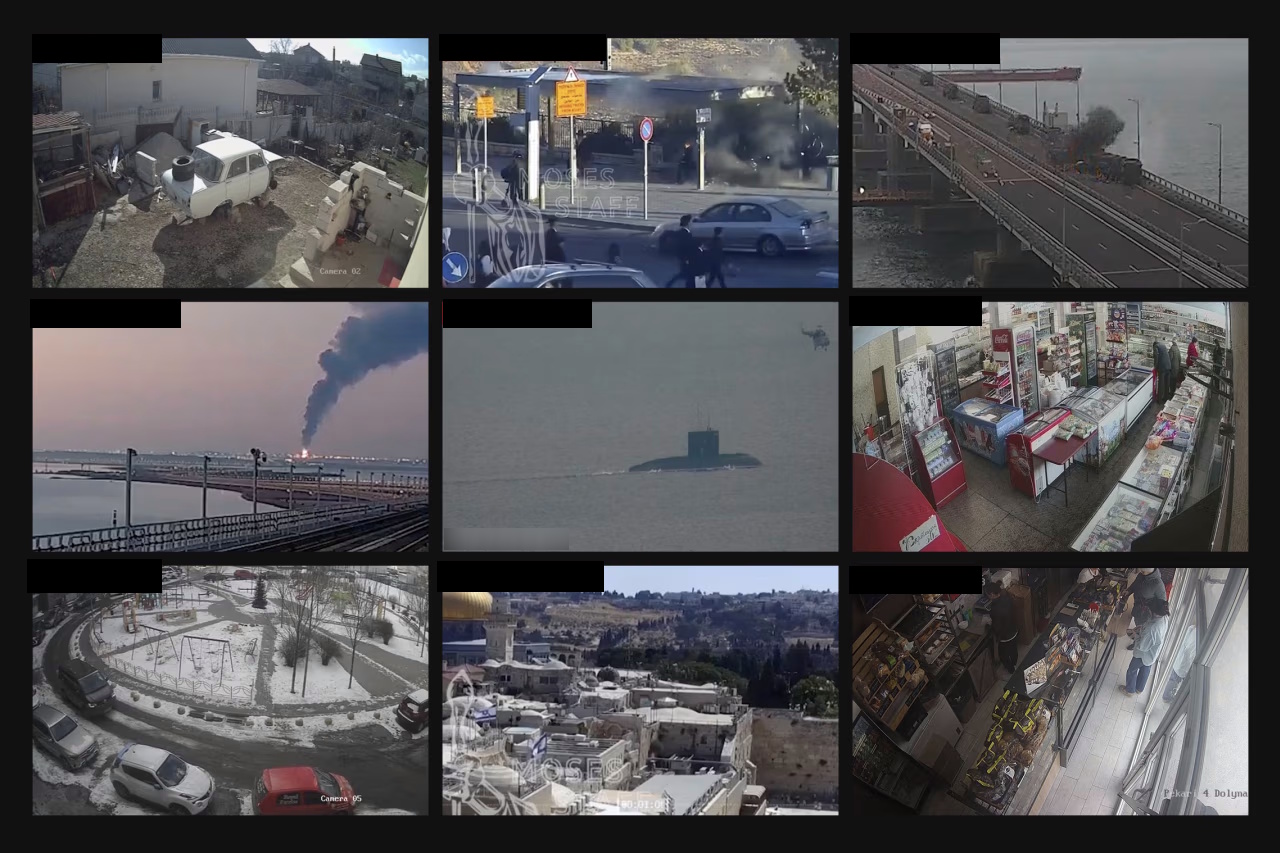
Every good hacker movie seems to have a scene where someone hijacks a camera feed to track a target or help pull off an operation. It’s also a favorite theory among conspiracy nuts: the government is tapping into cameras to watch our every move (like in China). But what if the premise wasn’t so far-fetched? What if thousands of cameras across the country could be turned into surveillance tools by anyone, all because of a subtle flaw that let them reset the admin password and log in?
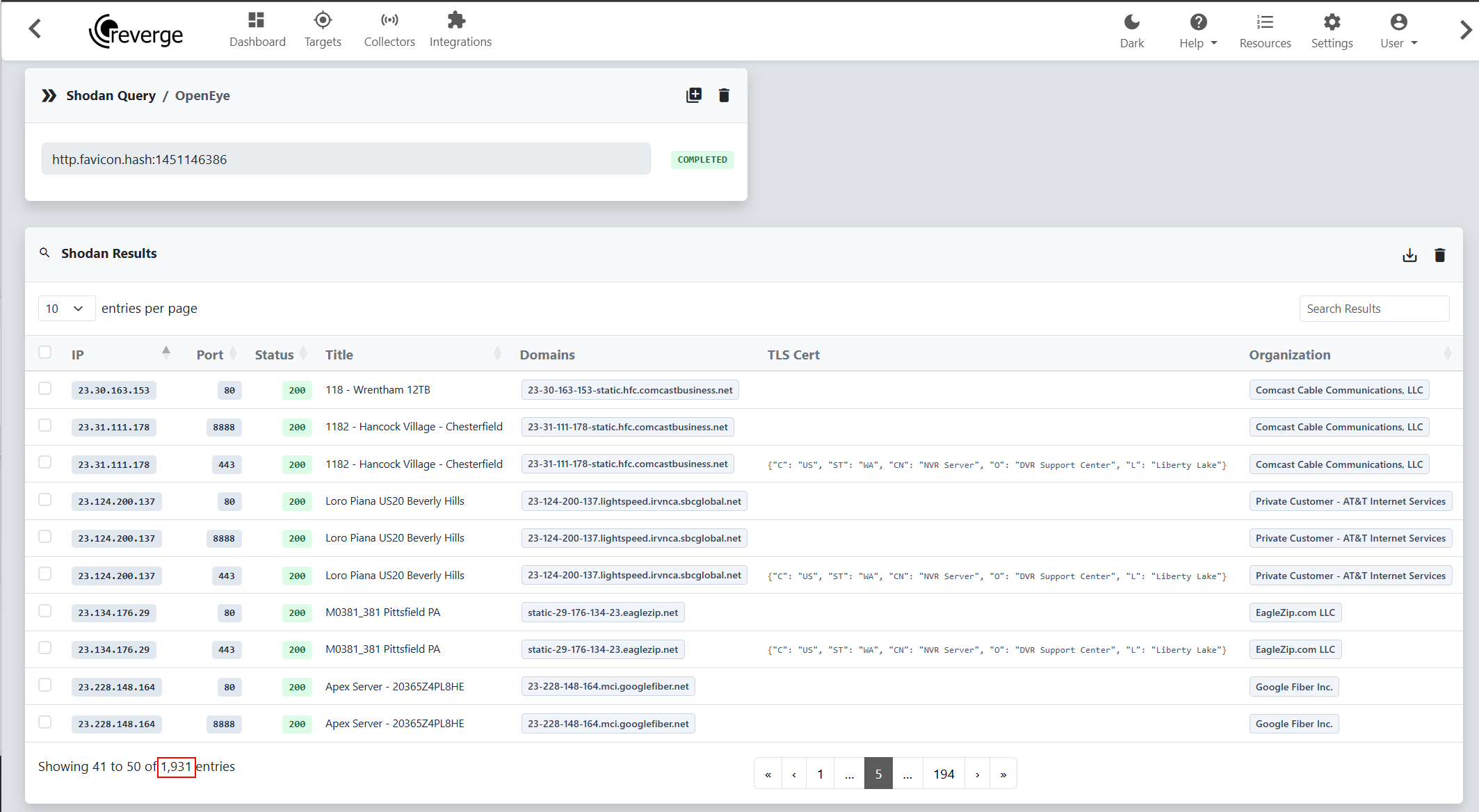
Turns out, the right bug, or chain of bugs, makes this entirely possible. With help from GPT 5.6 sol, I found just such a chain in a couple of hours while examining a commercial camera sold by OpenEye and commonly used for outdoor surveillance. A quick Shodan search turns up nearly 2,000 of these cameras exposed to the internet.
Password recovery is a good place to look for this kind of bug. Its whole purpose is to get an administrator back into a system when the normal login fails. Get that process wrong, and an attacker might get the same access.
The target here was OpenEye Apex, the software that runs on its video recorders and manages a site’s cameras and footage. Compromising one recorder could expose live feeds and stored video from every camera connected to it, let an attacker disable recording, or provide a foothold on the local network.
I gave Codex two tasks: find a copy of the firmware/appliance on the internet and find a way from an unauthenticated request to root.
After exploring the code base, it landed on password recovery. Apex had a hidden account with a fixed password, a reset page that could be tricked into accepting a remote request as local by changing a request header, and an unlock code that could be calculated without a secret. Put those together, and an attacker could reset the real administrator’s password to a publicly known default.
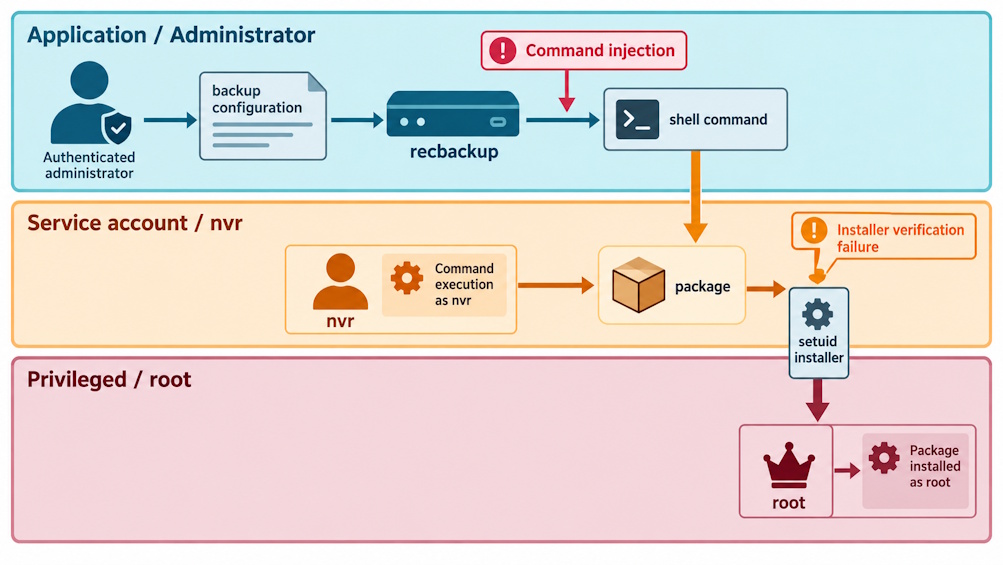
Administrator access opened up the next step. A command injection in the backup tool, recbackup, could run commands as the nvr service account. A flaw in a package installer with root privileges could then take that access all the way to root.
The chain spans four CVEs: CVE-2026-92928, CVE-2026-92929, CVE-2026-92930, and CVE-2026-94367.
Starting with the installer
The Linux update came as an .ssp file, which turned out to be an OpenPGP wrapper around a gzip stream containing a Debian package and update scripts.
Getting to the useful files meant working through these layers:
Copy to Clipboard
The main application lived in starbox.jar and ran as the unprivileged nvr account. For tasks that needed root, it called setuid helpers under /opt/nvr/bin, including the package installer, installdeb.
That gave me both ends of the chain in one update package: the Java authentication logic and the privileged helpers. A command injection in recbackup could get code running as nvr, and a flaw in installdeb could take that access to root.
When localhost comes from a header
Several Apex routes and code paths trusted HttpServletRequest.getRemoteAddr() to decide whether a request came from the recorder itself. Spring Security used the same value for rules such as hasIpAddress('127.0.0.1').
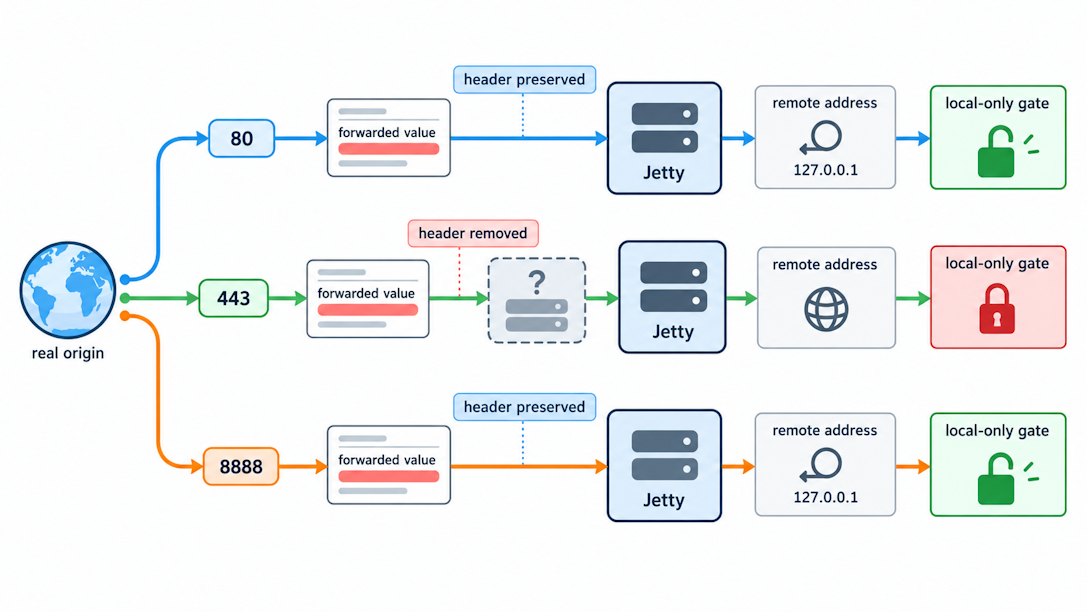
In the two non-TLS interfaces, the forwarding configuration allows an external X-Forwarded-For value to replace that address. A remote request could therefore present itself to the application as loopback:
Copy to Clipboard
Conceptually, the trust decision became:
Copy to Clipboard
Apex exposed the same application on ports 80, 443, and 8888, but the header trick only worked on 80 and 8888 in our tests. On those ports, the spoofed X-Forwarded-For value reached Jetty and let a remote request pass the application’s localhost checks.
We couldn’t reproduce the bypass on port 443, which blocked this step in the chain. Our working theory is that an extra web layer on the HTTPS path stripped or rewrote the header before it reached Jetty. We couldn’t confirm that explanation, but the result doesn’t mean TLS itself protected against the bug.
The header also wasn’t a login bypass on its own. Routes protected by isAuthenticated() still required a valid session. The recovery account supplied that session; the spoofed header then got it through the additional checks that treated localhost as proof of local access.
This issue was assigned CVE-2026-92929, with a CVSS 3.1 score of 5.3. The published record identifies Apex 3.5.4 as the fixed release.
The account the administrator cannot see
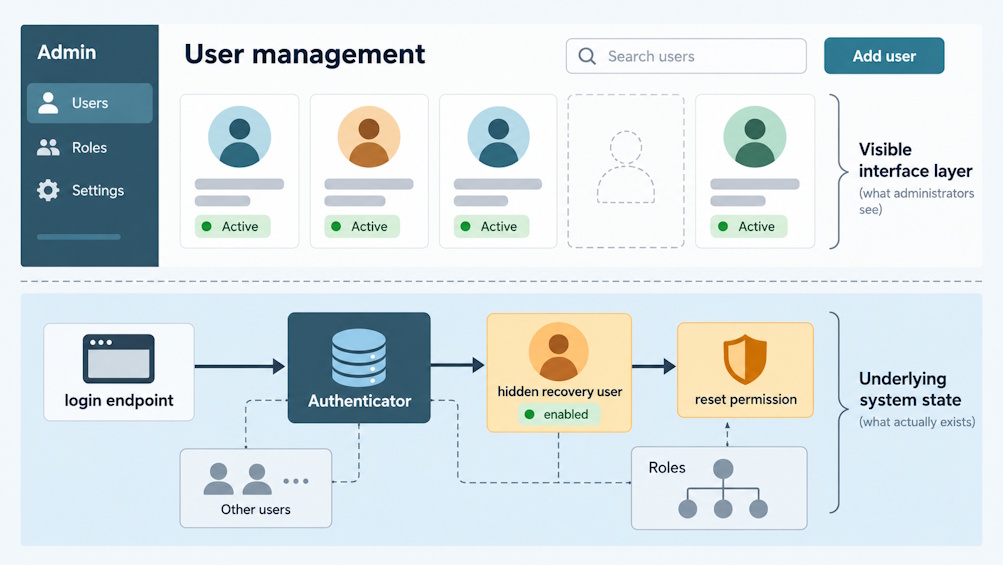
At startup, Apex created a hidden recovery account named resetpasswd alongside the visible administrator account. It came with a fixed password.
The startup code spelled it out:
Copy to Clipboard
This account persists after setup. Whenever it was missing at startup, Apex created it and assigned it the password-reset role.
The management screen hid both resetpasswd and autologin, so an administrator could change the visible admin password without ever knowing the recovery account existed. The login code still treated resetpasswd as a normal, active local user. I found no product workflow that rotated its password or let an administrator disable it.
The hardcoded credential was assigned CVE-2026-92928, with a CVSS 3.1 score of 6.5. The published record lists Apex 3.2.9.376 as affected, notes that the design existed as far back as 2.2.3.4, and recommends upgrading to 3.5.4.
The reset-admin permission was also tied to the username itself. The authorization code stripped that permission from every authenticated account except the one literally named resetpasswd:
Copy to Clipboard
The recovery account was therefore not an accidental leftover with a harmless role. It was the only web principal designed to complete the administrator-reset operation.
A reset code with no secret
Logging in as the recovery account was only the first step. The reset action also required an unlock code tied to the recorder’s system ID and an expiration date.
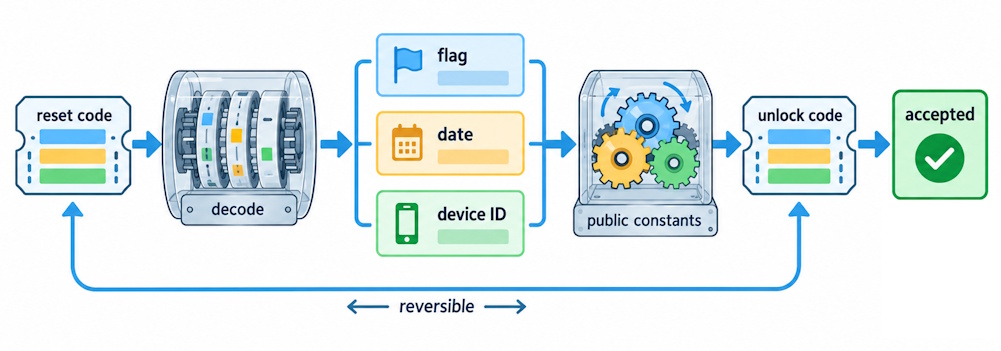
At first glance it looked like a second auth factor, but the code was just encoded data with no secret behind it. The validator decoded it and checked three things:
-
The unlock flag equaled
810. -
The system ID matched the recorder.
-
The expiration date was in the future.
Here’s how the code was put together:
Copy to Clipboard
There was no HMAC, signature, or secret key involved. All the constants and encoding logic shipped in the application JAR. It even included UnlockCodeGenerator, a class for creating new codes.
The reset page supplied the missing input: the recorder’s system ID. It was embedded in the expiring reset code and could be recovered by undoing the fixed scrambling operation. Anyone who could read that page could get the ID.
The scrambling made the data look unfamiliar, but it didn’t prove who created it. With the format and inputs available, an attacker could generate an unlock code that passed the checks.
This design was assigned CVE-2026-92930, with a standalone CVSS 3.1 score of 6.2. That score assumes physical access and an already privileged reset workflow. The other two bugs enabled an attacker to reach it: CVE-2026-92928 supplied the recovery account, and CVE-2026-92929 let a remote request pass the localhost checks. The unlock-code issue was fixed in Apex 3.5.4.
Turning recovery into administrator access
The reset path appeared to have several independent controls:
Copy to Clipboard
Each check had a different problem:
-
The recovery account used a fixed password. It was hidden from the interface but still worked through the normal login flow.
-
The localhost check trusted the header. A spoofed
X-Forwarded-Forvalue made a remote request look local. -
The unlock code needed no secret. The reset page supplied the system ID, and the bundled generator could create a code with a future expiration date.
-
The blacklist only blocked reuse. A freshly generated code had no entry on that list.
Once those checks passed, resetAdminDefaultPassword() did exactly what its name suggested: it reset the main administrator’s password to the documented Linux default.
There was no need to guess the current password or crack its hash. The application replaced it with a known value. Changing the factory password hadn’t closed this path, the recovery workflow could change it right back.
Here’s the full web-side sequence:
Copy to Clipboard
CSRF protection was disabled, but the chain did not depend on tricking a victim’s browser. The recovery principal, code generator, and forwarded-address behavior were sufficient on their own.
Web administrator was not root—yet
Administrator login gave access to the Apex web application, but it didn’t automatically provide command execution on the appliance. The Java service ran as the unprivileged nvr user.
The next step was CVE-2026-94367, an authenticated command injection in recbackup. The backup workflow passed administrator-controlled settings into a shell command, allowing a crafted value to turn application access into command execution as nvr.
Copy to Clipboard
The command injection was scored 7.2 under CVSS 3.1. The published record lists Apex 3.2.9.376 as affected and 3.4.3 as the fixed release. On its own, it required administrator access. The three recovery bugs supplied that access remotely.
Getting from nvr to root took one more step. /opt/nvr/bin/installdeb was installed setuid root and executable by the nvr group. It ran dpkg on a Debian package supplied by the caller without verifying the package’s signature.
The normal update wrapper checked signatures before calling installdeb, but the installer itself didn’t enforce that check. With command execution as nvr, an attacker could call the privileged installer directly and skip the wrapper entirely.
The final jump to root looked like this:
Copy to Clipboard
CVE-2026-94367 supplied the application-level command execution. The unsigned setuid installer amplified that execution into root. They were separate bugs at separate privilege boundaries, and the second one made any future nvr-context code execution equally dangerous.
The fix
This chain cannot be corrected at only one endpoint. Each trust boundary needs its own change.
-
Do not trust forwarding headers from arbitrary clients. Strip them at the network edge and configure Jetty to accept them only from an explicit trusted proxy. Security decisions should use a verified connection identity, not a caller-supplied header.
-
Remove the fixed recovery credential. Recovery principals should not be remotely authenticatable with a product-wide password. Use a unique per-device secret established during enrollment, make the account visible to administrators, and support rotation, disablement, and audit logging.
-
Authenticate unlock codes. Sign or MAC every code with a protected key. Bind it to the device, operation, expiration, and a one-time nonce. Reversible scrambling is not a substitute for a cryptographic authenticator.
-
Do not reset an administrator to a public default. Issue a high-entropy one-time credential, require an immediate password change, and prefer a physical or separately authenticated recovery action.
-
Treat backup configuration as data. Constrain paths, share names, identifiers, and credentials to explicit formats. Do not concatenate any backup-area field into a shell command.
-
Remove the shell from
recbackupand privileged helpers. Use direct system calls or fixed argument vectors. Drop setuid where possible and move privileged operations behind a small broker with explicit operations and typed inputs. -
Verify at the privileged boundary. If a root installer accepts packages, it must independently enforce signature and provenance checks instead of trusting an unprivileged wrapper to do so first.